Concept· where every style starts
Every product starts as a sketch.Take yours all the way to the factory.
Datum is the free PLM for physical products: spec, tech pack, 3D, samples, costs and every factory question on one record. AI does the paperwork, priced before it runs, and you accept it line by line.
Free for 10 active styles · clients and factories join free · 30 + 10 AI credits to start · no card
Drafting the first tech pack…First tech pack drafted · 8 credits
- Style
- Talus 22L Daypack
- Stage
- Concept
- Rev
- Draft
- Studio
- Northline Product Studio
- Target FOB
- $16.50
- Sheet
- 1 of 1
- Concept
- Development
- Sampling
- Eng. build
- Pilot
- Production
How it works
From a sketch on a napkin to 12,000 units off the line.
Follow one daypack through every stage gate. The record you start at concept is the one the factory builds from, so nothing is retyped along the way.
22 L, fits a 15″ laptop
stash zip up front?
BOM
- AF02420D Oxford0.24 yd
- BW0125 mm webbing1.75 m
- CZ01#5 coil zip1 pc
- DB0125 mm buckle2 pcs
AIread from
HF-Q26-R2.xlsx · BOM!D14
“420D OXFORD PU2 0.24YD”
MLMove the stash zip 20 mm up and keep it centred.
Done on page 3. Two callouts and the BOM note moved with it.
95 → 75 mmUndo
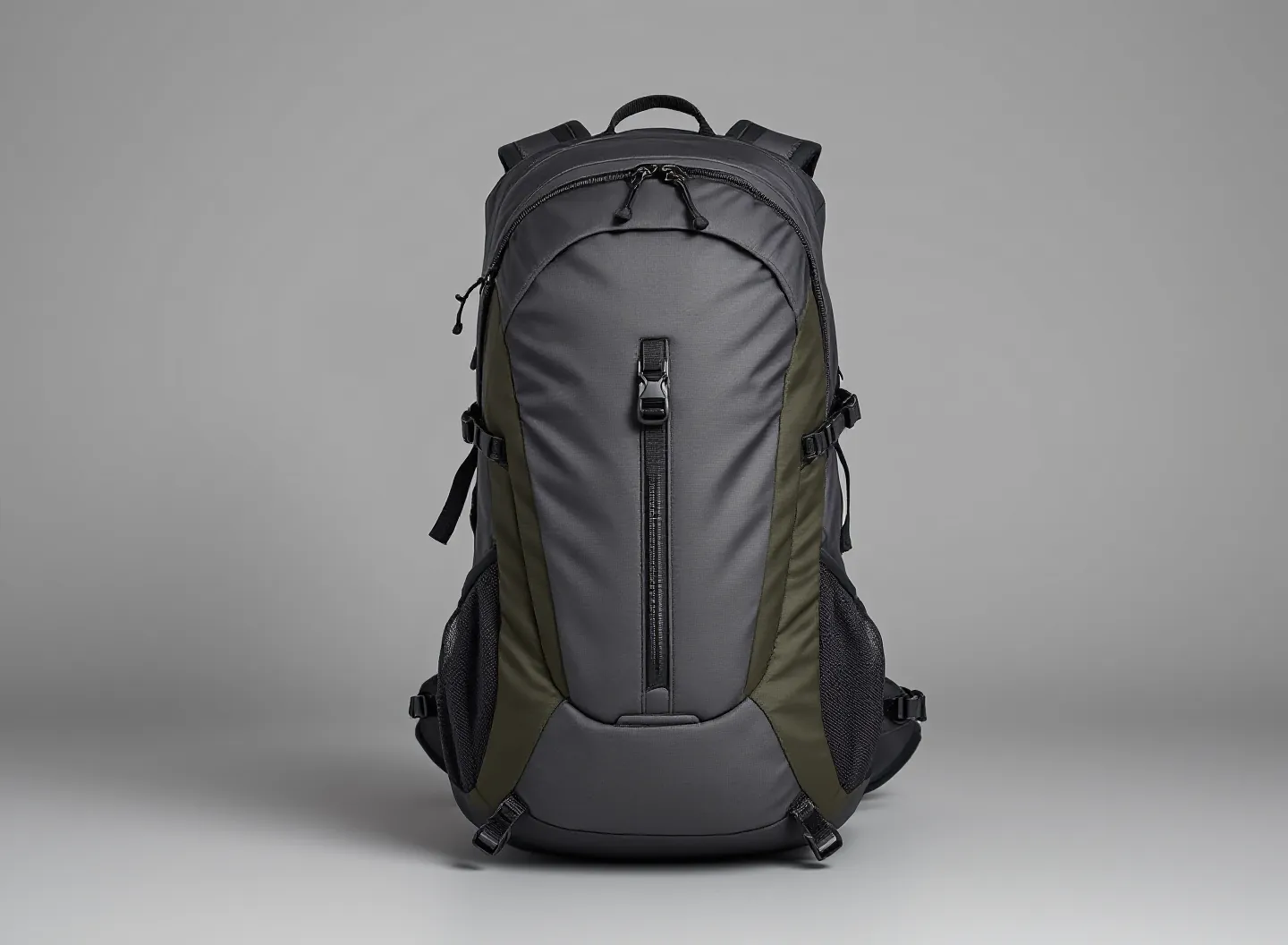 REC 0:15Turn it once, slowly
frames from the clip
Clean model · to scale480 mm290 mmCapacity
22.1 L
from the 15 s clip
Built in 10 to 15 minutes
P1 · readings±5 mm
- ABody height482PASS
- CWidth291PASS
- PPocket depth187FAIL
12/16 in tol.
AIDrafted to Hengfeng
Pocket depth reads 187, 7 mm over. Please check the pocket facing before P2.
FOB · USDtarget 16.50
Hengfeng sits inside the should-cost. Factory B is 0.70 over target.
Should-cost
- Materials8.42
- Labour · 24 ops4.96
- Overhead, margin2.12
KZKelly ZhouFactory
Q5 · Haul loop webbing: black or olive?
MLOlive, changed in Rev BΔ
Units off the line
0
Hengfeng · PO 3中文Tiếng Việt
58 in roll0.226 yd / unit87% utilisation
8 pieces nested
01Concept
It starts with a sketch and a hunch.
Drop in what you have: a napkin sketch, photos of last year’s sample, a note to yourself. AI drafts a first tech pack from them, priced before it runs.
AI add-on: 8 credits
02Development
The sketch becomes a spec.
Materials, BOM and points of measure with a tolerance next to every nominal. Type them in, or let AI read the packs and cost sheets you already have; every value cites the page it came from.
Included: Free to edit · 3 credits, + 1 a page after 2
03Development
A drawn tech pack you can talk to.
Click a dimension and type, or just ask: “move the stash zip 20 mm up.” The drawing, callouts and BOM note change together, marked on every page it touches, with undo.
AI add-on: 1 credit a change
04Development
To scale, from a 15-second clip.
Film the first sample turning in front of your phone and give one real measurement. AI picks frames from the clip and builds a 3D model at true size: measure it, read its capacity in litres, and get pictures in situations for the line review.
AI add-on: 20 credits a model
05Sampling
P1 lands. Measure it against tolerance.
Paste the factory’s readings or drop the dim report. PASS and FAIL are computed for every POM, and the comment back to the factory is drafted for you.
Included: Free
06Sampling
Hold every quote to a should-cost.
Quotes side by side against your target, and a should-cost from materials and labour by operation, so you know a fair FOB before you negotiate.
Included: Free
07Pilot
Release Rev A. The factory sees what moved.
Freeze the spec and send it on a secure link. Every later change carries a Δ, the factory asks on the record, and the answer lands in the next revision.
Included: Free · factories join free
08Production
Cut, sew, ship. Then do it again.
Patterns nested on your roll width, yield per unit, line cards in the factory’s language. Reorders, a second factory and next season’s colourways all start from the same record.
Included: Free tools · 3 credits to translate
Your turn
That was one daypack. Start yours this afternoon.
30 AI credits come with the account: enough to read a tech pack into a style, draft another from photos, and ask for 19 changes. The record, the tools and your guests are free for good.
The free PLM
Everything a style needs, on one record.
Free for good.
Not a trial and not a cut-down tier. The whole record, every production tool and every guest are free; you pay only for AI work that costs us model or GPU time.
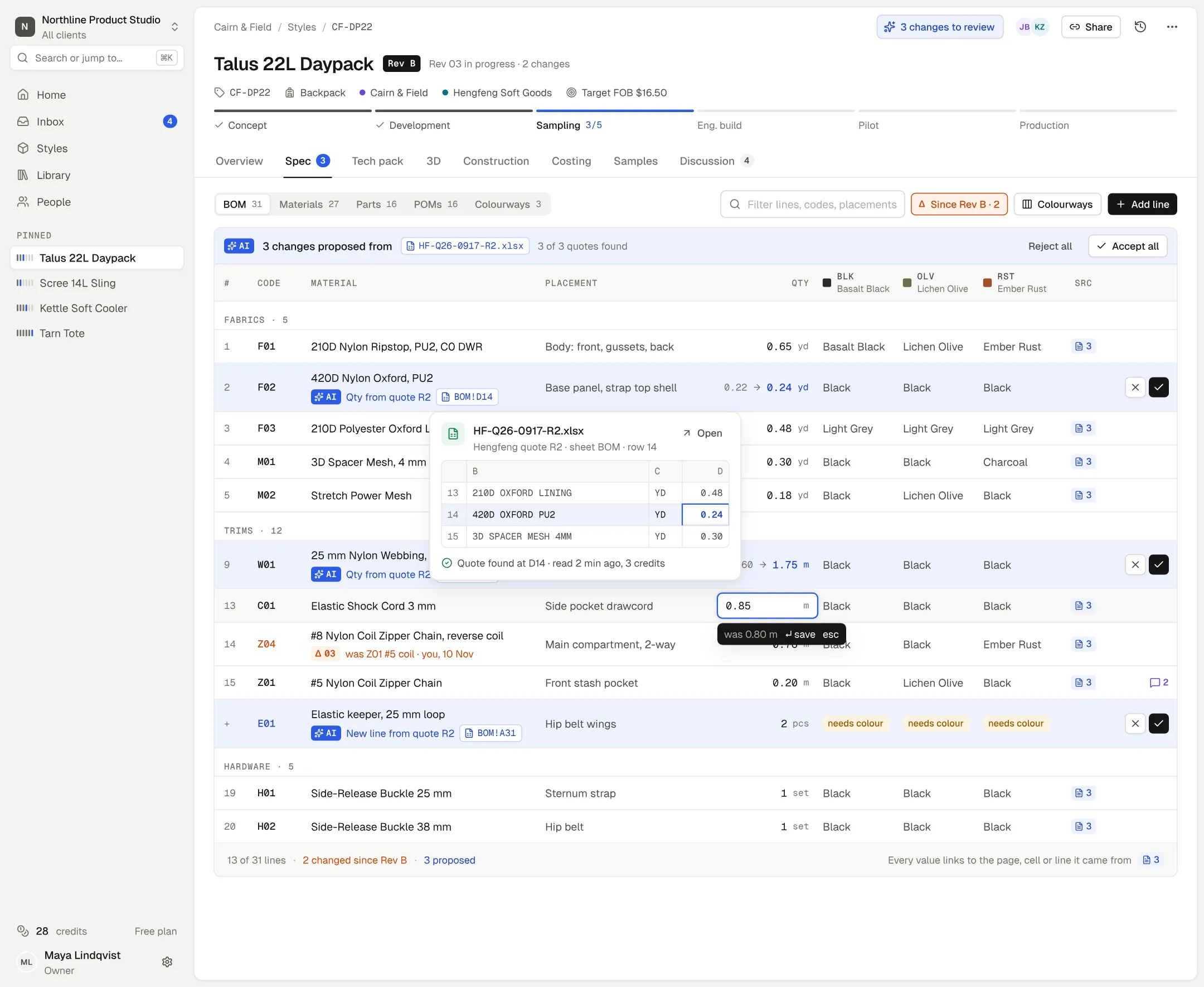
AAgents propose. You accept.
A quote, tech pack or email becomes proposed changes, old → new, line by line. Nothing changes until you press ✓.
BEvery value cites its source.
Hover any AI value for the file, sheet and cell it came from, and the words found there.
CΔ on everything since the release.
Rows changed since Rev B carry a Δ and what they were, so the factory sees exactly what moved.
DEdit by hand, free.
Click a cell and type. Editing, the PLM and the production tools never use credits.
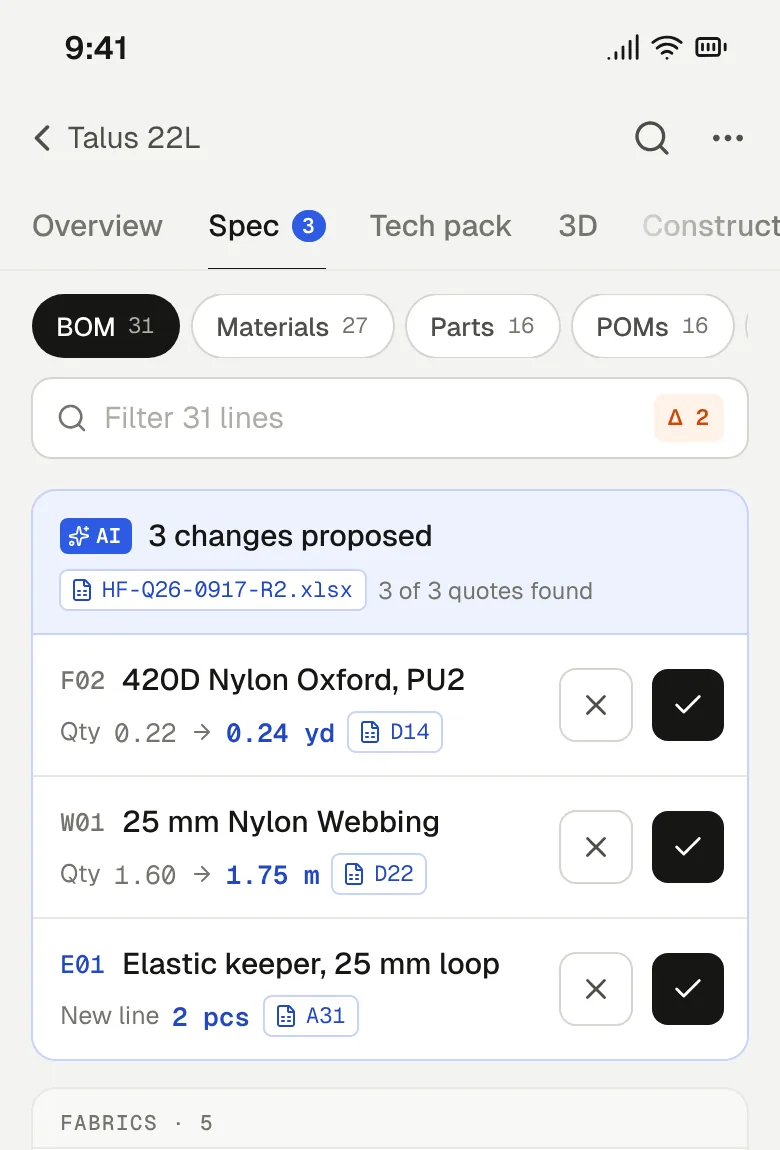
AAgents propose. You accept.
Old → new, line by line, with ✓ and ✕ on each. Nothing changes until you accept.
BEvery value cites its source.
Tap a source for the file, sheet and cell, and the words found there.
- 01
Overview
Status, Up next and the stage gate: what to do now, and who it waits on.
Sampling - 02
Spec
BOM, materials, parts, POMs and colourways. Tolerance next to every nominal.
480 ±10 mm - 03
Tech pack
The drawn pack and the table pack are one artifact. Release and send in one step.
Rev 03→Rev C - 04
3D
A to-scale model from a phone clip, and pictures in situations for line review.
480 × 290 × 150 mm - 05
Construction
Patterns, cutting, assembly and strength: the factory’s maths, done first.
87% utilisation - 06
Costing
Quotes against target and against each other, with a should-cost to hold them to.
15.77 vs 16.50 USD - 07
Samples
Readings against tolerance, PASS and FAIL computed, comments to the factory drafted.
12/16 POMs in tol. - 08
Discussion
Questions that wait on someone, answered on the record and carried into the next revision.
Q7 · waiting on factory
- OverviewStatus, Up next and the stage gate01
- SpecBOM, parts, POMs and colourways02
- Tech packDrawn pack, revisions and release03
- 3DTo-scale models and pictures04
- ConstructionPatterns, cutting, assembly, strength05
- CostingQuotes against target, should-cost06
- SamplesReadings against tolerance07
- DiscussionQuestions that wait on someone08
AI add-ons
AI that shows its work, priced before it runs.
Bring last season’s tech packs, cost sheets, dim reports and factory emails. Datum reads them into the record as proposals with citations, and redraws the pack so you can change it by clicking a dimension or asking in plain words.
- Nothing read from a document changes the record until a person accepts it
- The price is fixed and shown before anything runs
- A run that fails is refunded, automatically
What things cost · credits
- Read a document into the record
- 3 + 1/page after 2
- Rebuild an existing tech pack
- 5 + 1/page
- Draft a tech pack from photos and files
- 8
- Change request to the assistant
- 1
- Review as the factory
- 3
- 3D model from a clip
- 20
Packs from $15 for 100 credits. 30 free when you sign up, 10 more when you confirm your email.
Rebuild a tech pack
CF-DP22 · Talus 22L Daypack5 + 1/page · 19 creditsF02420D Nylon Oxford, PU2· Qty
0.22 yd→0.24 ydHF-Q26-R2.xlsx · BOM!D14“420D OXFORD PU2 0.24YD”
W0125 mm Nylon Webbing· Qty
1.60 m→1.75 mHF-Q26-R2.xlsx · BOM!D9“25MM WEBBING 1.75M”
Ask the assistant
Tech pack · page 3 of 101 credit a changeMLMove the front stash zip 20 mm toward the top and keep it centred.
What things cost · credits
- Read a document into the record
- 3 + 1/page after 2
- Rebuild an existing tech pack
- 5 + 1/page
- Draft a tech pack from photos and files
- 8
- Change request to the assistant
- 1
- Review as the factory
- 3
- 3D model from a clip
- 20
Packs from $15 for 100 credits. 30 free when you sign up, 10 more when you confirm your email.
Production tools · free to run
The maths your factory does, done before you ask for the quote.
Six tools that work on the record’s own numbers. Results land on the style, with the method written next to them.
- Tool 01
Patterns from a photo
Shoot the pieces on a sheet of A4. Get scaled outlines, named and counted.
5pieces
Largest 421 × 262 mm, ±2 mm
DXFSVGPDF at 100%
- Tool 02
Nesting and yield
Markers on your roll widths, with fabric per unit and utilisation.
0.226yd / unit
87% utilisation on a 58 in roll
- Tool 03
Should-cost
Materials, labour by operation, overhead and margin: a fair FOB to hold the quote against.
14.90–16.10USD
Likely FOB · Hengfeng’s R2 at 15.77 sits inside
- Tool 04
Cpk on sample builds
Paste the factory’s readings. See which POMs are off target and which just spread.
- ABody heightCpk1.42
- JStrap lengthCpk1.12
- PPocket depthCpk0.87
- Tool 05
Line instructions
An operation sequence and line cards for the floor, translated for the factory.
24operations
Line cards for the floor · 3 credits to translate
English中文Tiếng Việt
- Tool 06
Strap and handle strength
Which stitch lets go first in a snag, and the lab test to ask for.
~610N
Bar-tack at the strap anchor fails first
Estimate · confirm with a lab pull test
- Patterns from a photo5 pieces, largest 421 × 262 mm5 pcs
- Nesting and yield87% on a 58 in roll0.226 yd
- Should-costLikely FOB · quote 15.77 inside14.90–16.10 USD
- Cpk on sample buildsP · pocket depth, lowest0.87 Cpk
- Line instructions中文 and Tiếng Việt line cards24 ops
- Strap and handle strengthEstimate · bar-tack fails first~610 N
3D
A to-scale 3D model from a 15-second phone clip.
Hang the sample and turn it for fifteen seconds. Get a model you can spin, measure and set next to a drinks can or an A4 sheet, its capacity in litres, and pictures in situations for the line review. On a phone, put it in the room at true size.
- Size
- 480 × 290 × 150
- mm, measured
- Capacity
- 22.1 L
- from the clean model
- Price
- 20
- credits a model
Pictures in a situation: 4 credits each. A share link opens the model for anyone, no account.
Clean model · AI-generated from 4 frames480 mm290 mmTurn the sample in front of your phone for fifteen seconds. Spin it, measure it, see it next to an A4 sheet, or put it in the room at true size.
- Size
- 480 × 290 × 150
- mm, measured
- Capacity
- 22.1 L
- from the clean model
- Price
- 20
- credits a model
Pictures in a situation: 4 credits each. A share link opens the model for anyone, no account.
Clients and factories
Your clients and factories join free. They see your name, not ours.
Send a link. No seat, no plan, no training: each sees only what is theirs, on a phone or a desk.
- Sees their own styles, quotes and samples, nothing else of yoursSees only their own styles
- Comments on any line of the specComments on any line
- Signs off a revision, or asks for changes, in the appSigns off revisions in the app
Signed off Rev B4 Nov
- Gets only the revisions you send, with every change marked ΔGets only the revisions you send, marked Δ
- Asks questions on the record and gets answers in the next revisionAsks questions on the record
- Adds sample readings or uploads a dim reportAdds sample readings
Answered Q5 · webbing colour2h
Factories and clients in detail
Make your own with DatumThe only Datum they see on Free: a small badge in the footer. Pro sends packs under your studio’s name alone.
Pricing
Free to run your studio. Pay for AI when you use it.
Free
Most studios start here$0forever
- 10 active styles (discontinued don’t count)
- 2 studio editors
- Unlimited clients and factories, always free
- The whole PLM and every production tool
- 30 AI credits to start (+10 for confirming your email), 10 more each month
Pro
$39per editor a month, billed yearly
$49 month to month
- Unlimited styles and editors
- 150 AI credits a month, rolling over up to 300
- No “Made with Datum” on shared packs
- Everything in Free
AI credits
On any plan. Each price is fixed and shown before it runs; a run that fails is refunded.
- Read a document
- 3 + 1/page after 2
- Rebuild a tech pack
- 5 + 1/page
- Draft from photos and files
- 8
- Change request
- 1
- Review as the factory
- 3
- 3D model from a clip
- 20
Top up
- 100 credits
- 15¢ each
- $15
- 500 credits
- 13¢ each
- $65
- 2,000 credits
- 12.5¢ each
- $250
FAQ
Questions
Anything else: hello@datumplm.com. A person answers.
- Is the free plan a trial?
- No. No card, no clock. It is free because a good PLM costs us little to run, and your clients and factories seeing it is how other studios find us.
- Do factories or clients pay?
- Never. Invite every client and factory you work with; they don’t count as editors and never need a plan.
- What happens at style 11?
- Mark finished styles Discontinued (they stay readable and stop counting), or move to Pro. Nothing is locked or deleted, and you are told before, not after.
- What are credits for?
- AI work that costs us model or GPU time: reading documents, rebuilding and drafting packs, the assistant, 3D. Each run shows its price first. Editing by hand, the PLM and the production tools never use credits.
- Who owns my data? Can I export it?
- You do. Export any time, on any plan: tech packs as PDF, drawings as SVG, markers as DXF, and every document exactly as you uploaded it. A client sees only their own workspace, a factory only the packs you send it.
- Is it only for soft goods?
- Soft goods first: bags, packs, coolers, cases and covers. Anything with a BOM, a spec and a factory works today.
Put your next style in it this afternoon.
Name it and it’s in Concept. Or open the example first: a full daypack with its BOM, two quotes, a P1 report and the factory’s questions, ready in seconds.